Orca Slicer Release Notes: What Is the Latest Version?
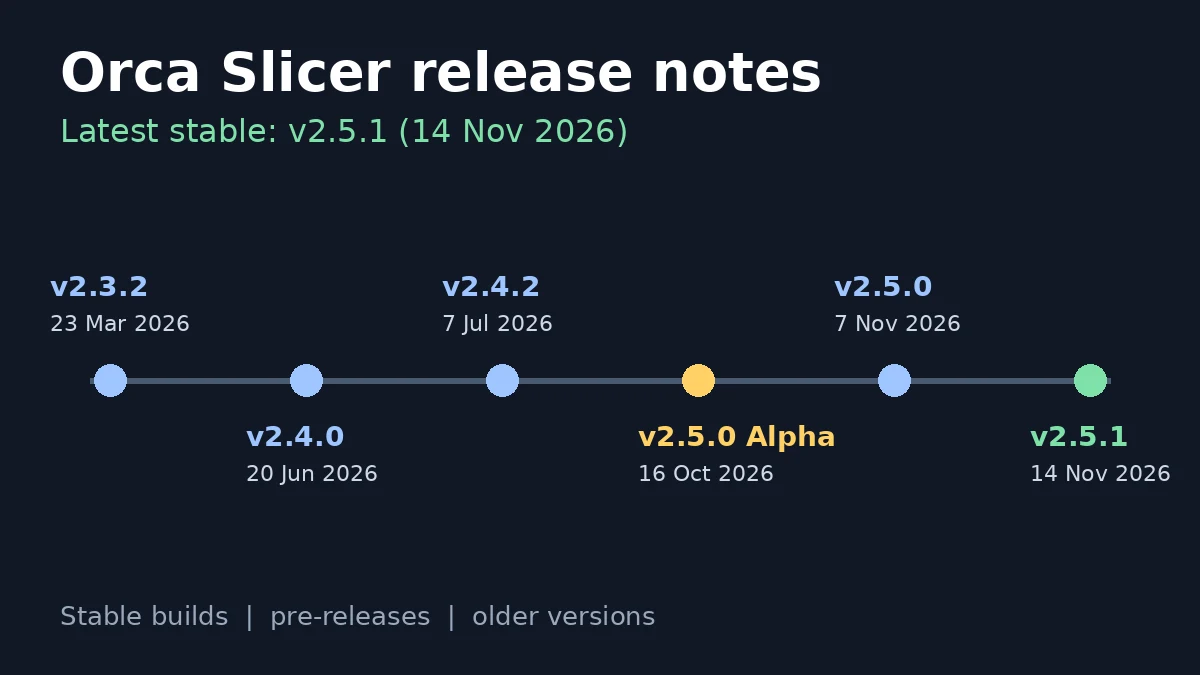
The latest version of Orca Slicer is v2.5.1, a stable release published on 14 November 2026. It fixes printer connection, crash, slicing and security problems found in v2.5.0, which arrived on 7 November 2026 as the biggest update in the project’s history. These Orca Slicer release notes summarise every stable version from 2.2.0 to 2.5.1, list the pre-releases, and show how to check and change the version you run.
What is the latest version of Orca Slicer right now?
Version 2.5.1 is the current stable build. The table lists the builds people search for most.
| Build | Type | Release date |
|---|---|---|
| v2.5.1 | Latest stable | 14 Nov 2026 |
| v2.5.0 | Stable | 7 Nov 2026 |
| v2.5.0 RC | Release candidate | 1 Nov 2026 |
| v2.5.0 Beta | Pre-release | 27 Oct 2026 |
| v2.5.0 Alpha | Pre-release | 16 Oct 2026 |
| v2.4.2 | Last 2.4 stable | 7 Jul 2026 |
| v2.3.2 | Last 2.3 stable | 23 Mar 2026 |
Get the installers for Windows, macOS and Linux on our Orca Slicer 2.5 download page, which links to the official files.
Orca Slicer 2.5.1 release notes (14 November 2026)
Version 2.5.1 is a maintenance update on top of 2.5.0. The main changes:
- Printer connections and uploads: fixes for problems sending jobs to printers. Bambu Lab LAN printers now use the HTTPS CA file you pick in the IP and access code dialog. If you chose a CA file before 2.5.1, you may need to choose it again.
- Security: a crafted AMF file can no longer freeze Orca on Windows and macOS, and plugin packages from PyPI now install over a trusted connection.
- Crashes: no crash when you edit an object’s speed or click in the Measure tool.
- Slicing: copies of an object print where they appear on the plate, spiral vase works with height range modifiers, and height ranges line up with Z shrinkage compensation.
- Multi-material: prime tower checks apply only when Orca prints a tower, and Precise Z height no longer makes the tower too big.
- New tools: toolchangers can copy per-nozzle settings to every tool, and Reload from disk now has a keyboard shortcut.
Orca Slicer 2.5.0 release notes (7 November 2026)
Version 2.5.0 came from nearly 1,300 pull requests by more than 180 contributors. It added:
- Python plugins that add tools, change how layers and G-code come out, or add panels. A Permissions tab shows what each plugin may do.
- Belt printer support and IDEX and IQEX printing for two to four parts at once.
- Color mixing, which blends new colors from the filaments you have loaded.
- Texture Displacement for real 3D surface texture, and an experimental Design tab for parametric parts.
- Toolhead collision volumes, so Arrange, brims and travel moves avoid bed clips and tool docks.
- Speed Dial, Precise Seam modifiers, new infill options and faster startup, slicing and export.
- Support for the Bambu Lab H2C and A2L, with mixed nozzle sizes on the H2D and X2D.
Two changes matter if you upgrade from 2.4: Bambu Lab process presets now default to Grid infill, and features left on Default in Filament for Features print with the object’s own filament. Back up your presets before you upgrade. Our guide on how to update Orca Slicer walks through the steps.
What came in the 2.5.0 alpha, beta and release candidate?
The alpha (16 October 2026) introduced plugins, belt printers, the Design tab, color mixing, Texture Displacement and Speed Dial. The beta (27 October 2026) added toolhead collision volumes, shorter travel moves, rounded infill corners and up to twice as fast slicing on detailed models. The release candidate (1 November 2026) fixed the blockers testers reported before the final release.
Orca Slicer 2.4 release notes
- v2.4.0 (20 June 2026): brought Orca Cloud for profile sync and preset sharing, Z Anti-Aliasing (ZAA) contouring, Machine Input Shaping, native Wayland support on Linux, sending sliced jobs as a packaged 3MF, a Microsoft Store install channel and a skirt overhaul.
- v2.4.1 (28 June 2026): added a native Windows ARM64 build, a Minimal chamber temperature field for filaments, a reworked skirt and brim generator, and many profile fixes.
- v2.4.2 (7 July 2026): made profiles, cloud sync and printer connections more dependable and added the
{first_object_name}filename placeholder and Wiki links in Preferences. It also arrived on the Microsoft Store and Flathub.
Orca Slicer 2.3 release notes
- v2.3.0 (20 March 2025): backs up user profiles when Orca upgrades and lets brims form inside the holes of other objects.
- v2.3.1 (5 October 2025): fixed regressions from the beta, improved Z-axis G-code handling and shipped with a much larger official wiki.
- v2.3.2 (23 March 2026): closed a security hole in 3MF import, added a configurable wipe tower type and launched the official Flathub package for Linux.
Older Orca Slicer versions
Version 2.2.0 arrived on 28 October 2024, and 2.1.0 and 2.1.1 followed in June 2024. Builds up to 2.3.1 came from the old SoftFever/OrcaSlicer repository on GitHub. The project now lives at OrcaSlicer/OrcaSlicer, and the old links redirect there. Every older version stays available on the official OrcaSlicer releases list: open a version, scroll to Assets and pick the file for your system.
Should you run the newest version or an older one?
Run the latest stable build unless a specific bug stops you. Stable builds fix problems from the pre-releases, and new printer profiles only reach current versions. Pick a pre-release or nightly build only when you want to test a feature early, and expect bugs. If an update breaks a workflow, install the previous version again, or run the Windows portable zip next to your installed copy so you can compare both. Our Orca Slicer not working guide covers fixes for crashes after an update.
How do you check which Orca Slicer version you have?
On Windows and Linux, open Help > About Orca Slicer. On macOS, open the OrcaSlicer menu and choose About. The window shows the version number, such as 2.5.1. Orca also shows a notice when a newer stable release comes out, unless you turned update checks off in Preferences.
Frequently asked questions
What is the latest version of Orca Slicer?
The latest stable version is v2.5.1, released on 14 November 2026. It fixes crashes, slicing bugs, printer connection problems and security issues from v2.5.0.
When did Orca Slicer 2.5.0 come out?
OrcaSlicer 2.5.0 became a stable release on 7 November 2026, after an alpha on 16 October, a beta on 27 October and a release candidate on 1 November 2026.
Is the Orca Slicer 2.5 alpha still worth using?
No. The stable 2.5.0 and 2.5.1 builds include everything from the alpha plus many fixes, so install 2.5.1 instead.
Where can I download an older version of Orca Slicer?
Open the official OrcaSlicer releases list on GitHub, pick the version you need and download its file from the Assets section.
Will updating Orca Slicer delete my profiles?
No. Orca keeps your user presets and backs them up on upgrade since version 2.3.0. Export a copy before a major update to stay safe.
Get the newest build
Version 2.5.1 is the best place to start for new and existing users. Grab the official installer from our Orca Slicer download guide, then explore the new settings in the Orca Slicer wiki.