Orca Slicer Mac: How to Install It on Apple Silicon and Intel
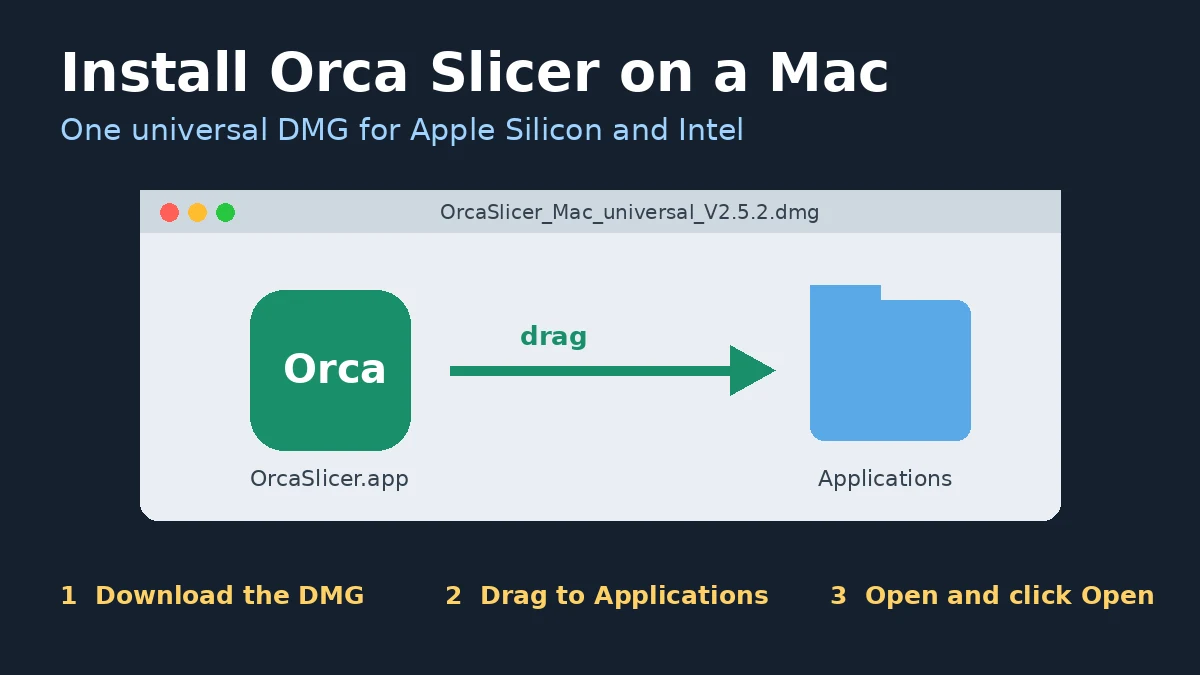
Orca Slicer Mac support is official: the project ships one universal DMG file that runs natively on Apple Silicon (M1 to M5) and on Intel Macs. You download OrcaSlicer_Mac_universal_V2.5.2.dmg from the official GitHub releases page, drag OrcaSlicer into your Applications folder and open it. Release builds carry Apple code signing and notarization, so most Macs show only the normal “downloaded from the internet” prompt on first launch.
This guide covers the system requirements, the install steps, the security warnings you might see, Homebrew, updates, and fixes for the crash and speed problems Mac users report most.
Does Orca Slicer work on Mac?
Yes. OrcaSlicer runs on macOS alongside Windows and Linux, and the Mac version has the same features, menus and calibration tests as the other builds. The project offers it free under the AGPL-3.0 licence, and GitHub hosts the official downloads.
| Item | Mac requirement or value |
|---|---|
| Download file | OrcaSlicer_Mac_universal_V2.5.2.dmg (about 360 MB) |
| Processors | Apple Silicon (M1, M2, M3, M4, M5) and Intel, in one universal app |
| Minimum macOS | 10.15 Catalina, the deployment target of the official release builds |
| Memory | 4 GB works for small plates, 8 GB or more suits large or multi-plate projects |
| Graphics | OpenGL 3.3, which every supported Mac provides |
| Disk space | About 500 MB for the app plus room for projects |
Version 2.5.2 came out on 21 November 2026 as a maintenance update for 2.5.1. It fixes crashes while slicing and STEP files that imported with faces missing. Our Orca Slicer release notes list what changed in each version, and the Orca Slicer 2.5 download guide compares every file in the 2.5 release.
Do you need a separate Apple Silicon or Intel version?
No. Older releases offered separate arm64 and x86_64 downloads, but current builds bundle both in a single universal app. macOS picks the right code on its own, so an M-series Mac runs OrcaSlicer natively without Rosetta 2. If you find an old guide that tells you to choose between two Mac files, ignore it and take the universal DMG.
How do you install Orca Slicer on a Mac?
The install takes about two minutes on a normal connection.
- Check your macOS version. Open the Apple menu and choose About This Mac. The official release builds target macOS 10.15 Catalina or later, and any Apple Silicon Mac meets that bar.
- Download the universal DMG. Open the official OrcaSlicer releases page on GitHub and download the file that ends in
Mac_universal_V2.5.2.dmg. It weighs about 360 MB. You need only this one file for both Apple Silicon and Intel. - Copy OrcaSlicer to Applications. Double-click the DMG in your Downloads folder. A window opens with the OrcaSlicer icon and an Applications shortcut. Drag the icon onto the shortcut and wait for the copy to finish.
- Eject the disk image. Drag the OrcaSlicer disk from the Finder sidebar or desktop to the Trash, or click its eject button. You can then delete the DMG to free space.
- Open OrcaSlicer. Open Applications and double-click OrcaSlicer. When macOS asks whether you want to open an app downloaded from the internet, click Open. You answer this prompt only once.
- Run the setup wizard. Pick your region, then select your printer and the filaments you use. Orca loads the matching system presets, and you can slice your first model right away.
After the wizard, open the printer preset and check the bed size, nozzle diameter and start G-code. Our printer selection guide explains how to add a printer the wizard does not list.
Can you install Orca Slicer with Homebrew?
Yes. The official README lists a Homebrew cask that installs the same DMG from GitHub. Open Terminal and run:
brew install --cask orcaslicer
To update later, run brew upgrade --cask orcaslicer. The cask can trail a new GitHub release for a short time, so check the version under OrcaSlicer, About OrcaSlicer if you need a fix from the latest build.
How do you fix the OrcaSlicer “damaged” warning on a Mac?
Gatekeeper blocks apps it cannot verify and may describe them as damaged. Official release builds pass that check, so a block on a release build usually means a broken download or a copy from an unofficial mirror. Delete the app, download the DMG again from GitHub and reinstall.
Nightly and pull-request builds skip notarization, and macOS treats them as unverified. The OrcaSlicer README gives three ways to open them:
- Right-click to open. Hold Control or Command, click the app, choose Open, then click Open in the warning. You do this once.
- Privacy and Security. Try to open the app, then go to System Settings, Privacy and Security, and click Open Anyway next to the OrcaSlicer message. Recent macOS versions remove the right-click route for some apps, so use this one on Sequoia and later.
- Terminal. Run
xattr -dr com.apple.quarantine /Applications/OrcaSlicer.appto clear the quarantine flag. Type a space betweencom.apple.quarantineand the path, or xattr reports that it expected two arguments.
Use these steps only on files you downloaded from the official OrcaSlicer GitHub account.
How do you update Orca Slicer on a Mac?
Download the new DMG and drag OrcaSlicer into Applications again. Choose Replace when Finder asks. Your printer, filament and process presets live in ~/Library/Application Support/OrcaSlicer, outside the app, so an update keeps them. Back up that folder before a major version jump. Our guide on how to update Orca Slicer covers the update prompt and rollbacks to an older version.
Why does Orca Slicer crash or run slowly on my Mac?
Work through these fixes in order:
- Update OrcaSlicer. Version 2.5.2 fixes several slicing crashes that started in 2.5.0. Crashes on launch after a macOS update often clear with the latest build.
- Update macOS. Apple Support told one Reddit user with launch crashes on Sequoia 15.0 to update to 15.3, and OrcaSlicer started again after the update.
- Reset the settings folder. Quit OrcaSlicer, rename
~/Library/Application Support/OrcaSlicertoOrcaSlicer-backupand open the app. If it starts, a broken preset or cache caused the crash, and you can copy your user presets back from the backup. - Split big plates. GitHub issue #11127 tracks long freezes on macOS when a plate holds dozens of objects. Spread large batches across several plates until a fix ships.
- Keep projects local. Projects stored on iCloud Drive or a network share load and save more slowly. Copy them to a local folder first.
For errors that also appear on Windows and Linux, see our Orca Slicer not working troubleshooting guide.
How do you uninstall Orca Slicer from a Mac?
Quit the app and drag OrcaSlicer from Applications to the Trash. To remove your presets too, delete ~/Library/Application Support/OrcaSlicer. Open that path from Finder with Go, Go to Folder. Skip the second step if you plan to reinstall and keep your settings.
Frequently asked questions
Is Orca Slicer available on Mac?
Yes. OrcaSlicer offers a free, official macOS build as a universal DMG on its GitHub releases page. One file covers both Apple Silicon and Intel Macs.
Does Orca Slicer run natively on M1 and other Apple Silicon Macs?
Yes. The universal app includes native Apple Silicon code, so M1 to M5 Macs run it without Rosetta 2. The same file also runs on Intel Macs.
Does Orca Slicer work on macOS Monterey?
Yes. The official release builds target macOS 10.15 Catalina or later, so Monterey (macOS 12) and every newer version meet the requirement.
Can I install Orca Slicer with Homebrew?
Yes. Run brew install –cask orcaslicer in Terminal. The cask installs the official DMG from GitHub, and brew upgrade –cask orcaslicer updates it.
Why does my Mac call OrcaSlicer damaged and refuse to open it?
Gatekeeper cannot verify that copy. On an official release, download the DMG again from GitHub. On a nightly or pull-request build, click Open Anyway in System Settings, Privacy and Security, or clear the quarantine flag with xattr.
Why does Orca Slicer keep crashing on my Mac?
Update OrcaSlicer and macOS first. If it still crashes on launch, rename the OrcaSlicer folder in Library, Application Support to reset its settings, then restore your user presets from the backup.
Start slicing on your Mac
Grab the universal DMG, drag it to Applications, and finish the setup wizard. Your first print can start within minutes. For download links on every platform, visit the Orca Slicer download page, then dial in your printer with our Orca Slicer calibration guide.