Orca Slicer Download Windows: Installer vs Portable Setup
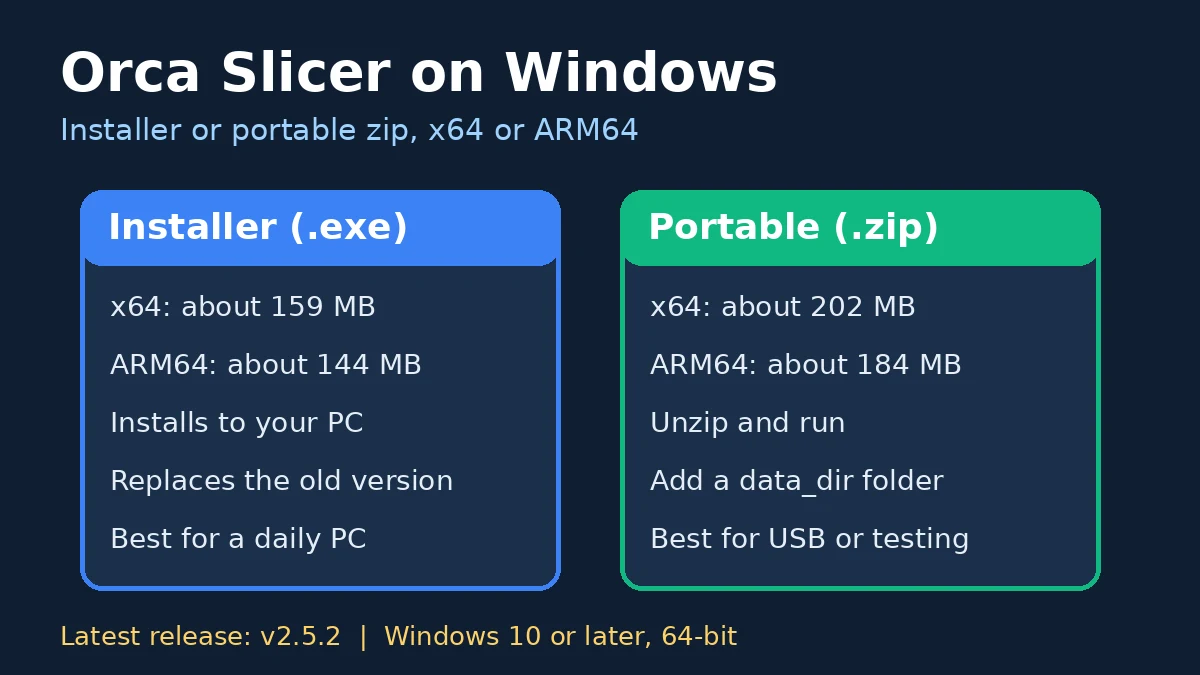
The Orca Slicer download Windows options come in four files: an installer and a portable zip, each in an x64 build for most PCs and an ARM64 build for Snapdragon laptops. The current release is v2.5.2, which came out on 21 November 2026. The x64 installer weighs about 159 MB, and the x64 portable zip weighs about 202 MB. You can also install from the Microsoft Store or with winget.
This guide helps you pick the right file, install it, run it without installing, and fix the Windows warnings and missing-runtime errors that block first launch.
Which Orca Slicer download for Windows should you pick?
Most people need the x64 installer. Pick another file only when you have an ARM64 PC, want to run Orca without installing, or prefer a Store package.
| Option | File size (v2.5.2) | Best for |
|---|---|---|
| Installer, x64 | About 159 MB | Intel and AMD PCs, the default choice |
| Installer, ARM64 | About 144 MB | Snapdragon and other ARM Windows PCs |
| Portable zip, x64 | About 202 MB | USB drives, test copies, locked-down PCs without admin rights |
| Portable zip, ARM64 | About 184 MB | The same uses on ARM PCs |
| Microsoft Store | Store package | Windows 11 PCs with Smart App Control turned on |
| winget | Command line | Fast installs and updates from a terminal |
Download only from the official OrcaSlicer GitHub releases page, the Microsoft Store listing or winget. Copies on other websites can carry malware. Our Orca Slicer 2.5 download guide compares every file in the 2.5 release, including the Mac and Linux builds, and the release notes list what changed in each version. Mac owners can follow our Orca Slicer Mac install guide.
What are the Windows system requirements?
- Operating system: 64-bit Windows 10 or later. Windows 11 works. Windows 7 and 32-bit Windows are not on the official list.
- Memory: 4 GB of RAM works for small plates, and 8 GB or more suits large projects.
- Graphics: A GPU and driver that support OpenGL 3.3.
- Disk space: About 500 MB.
A blank 3D view points to the graphics driver or the monitor cable. Update the driver, and plug the monitor into the graphics card instead of the motherboard.
How do you install Orca Slicer on Windows?
The installer takes about two minutes.
- Check your Windows version and chip. Open Settings, then System, then About. Under System type, look for 64-bit x64 or ARM64. Orca needs 64-bit Windows 10 or later.
- Download the right installer. Get the file that has Installer and your chip in its name from the official OrcaSlicer releases page. Choose x64 for Intel and AMD PCs, and ARM64 for Snapdragon PCs.
- Run the installer. Double-click the file. If SmartScreen or User Account Control asks for permission, confirm that the publisher reads ORCASLICER PTE. LTD. and click Yes.
- Finish the setup wizard. Follow the installer pages and let it complete. If an older version sits on the PC, the installer removes it first and keeps your settings.
- Open OrcaSlicer. Start the app from the Start menu or the install folder.
- Pick your printer and filaments. The first-run wizard asks for your region, printer and filaments. Choose your own models, and Orca loads the matching presets.
Add your printer next if it is missing from the list. Our printer selection guide shows how to set up a printer by hand.
How does the portable zip work?
The portable build needs no installer and no admin rights. Use it for a second copy, a USB stick or a test of a new version.
- Right-click the zip, open Properties and tick Unblock if the box appears. This stops Windows from blocking the unzipped files.
- Extract the zip to a folder you own, such as
D:\Orca. - Open the OrcaSlicer program file inside the folder.
The portable build still saves settings in %APPDATA%\OrcaSlicer by default, which surprises many people. To keep everything inside the folder, create an empty folder named data_dir next to the program file before the first launch. Orca checks for that folder at startup and stores all presets, logs and settings there. Copy the whole folder to another PC and your profiles come along.
Installer vs portable: which one should you use?
| Question | Installer | Portable zip |
|---|---|---|
| Admin rights | Windows may ask for them | Not needed |
| Settings location | %APPDATA%\OrcaSlicer | %APPDATA%\OrcaSlicer, or the data_dir folder if you create one |
| Updating | Run the new installer, which removes the old version first | Extract the new zip to a new folder, then copy your data_dir folder into it |
| Running two versions | One install at a time | Any number of folders, each with its own data_dir |
| Best for | One main PC | USB drives, testing, shared PCs |
Both builds contain the same slicer. Pick the installer for a daily PC and the portable zip when you need flexibility. Without a data_dir folder, two copies share one settings folder, so a test build can change presets that your main build uses.
Can you install Orca Slicer from the Microsoft Store or winget?
Yes to both. The Store package suits Windows 11 PCs with Smart App Control, because the Store signs the package. For winget, open Terminal and run:
winget install --id=SoftFever.OrcaSlicer -e
Update later with winget upgrade --id SoftFever.OrcaSlicer. Our guide on how to update Orca Slicer covers the in-app prompt and rollbacks.
How do you fix Orca Slicer Windows install errors?
Work through the message you see.
- “Windows protected your PC” from SmartScreen. Click More info, then Run anyway. Since version 2.5.0, the Windows installer and program files carry a signature from OrcaSlicer’s own certificate, so recent releases show the publisher name.
- The installer does nothing or Smart App Control blocks it. Smart App Control only trusts signed apps from known publishers. Install the Store version instead, because the Store signs its package.
- The app will not start, or panels stay blank. Install Microsoft’s Edge WebView2 Runtime and the Visual C++ 2015 to 2022 redistributable for x64. The official README lists both as the fix when a build refuses to run.
- The app crashes after launch. Quit Orca, rename
%APPDATA%\OrcaSlicertoOrcaSlicer-oldand open the app again. If it starts, a broken preset caused the crash, and you can copy your user presets back.
Our Orca Slicer not working guide covers startup failures in more depth, and the access violation error guide explains that specific crash message.
Does updating or uninstalling delete your profiles?
No. Orca keeps user presets in %APPDATA%\OrcaSlicer, outside the program folder, and neither a normal update nor an uninstall removes them. Back up that folder before a major version jump. Delete it by hand only when you want a completely clean start.
Frequently asked questions
Does Orca Slicer work on Windows 7?
No. The official requirements list 64-bit Windows 10 or later. Windows 7 and 32-bit Windows are not supported.
Does Orca Slicer run on Windows 11?
Yes. Windows 11 works with the x64 installer, and ARM64 Windows 11 PCs can use the ARM64 build.
What is the difference between the portable and installer versions of Orca Slicer?
They contain the same slicer. The installer adds Orca to your PC and replaces the old version when you update. The portable zip runs from any folder, and it keeps settings in the AppData folder unless you create a data_dir folder next to the program file.
Is there an ARM64 version of Orca Slicer for Windows?
Yes. Version 2.4.1 added a native Windows ARM64 build, and v2.5.2 offers both an ARM64 installer and an ARM64 portable zip.
Why does Windows Defender or SmartScreen block the Orca Slicer installer?
SmartScreen warns about apps with little download history. Click More info, then Run anyway. Windows builds since 2.5.0 carry OrcaSlicer’s own signature, so check that the publisher reads ORCASLICER PTE. LTD. before you continue.
Does the portable version of Orca Slicer still use the AppData folder?
Yes, by default. Create an empty folder named data_dir next to the program file before you launch it, and Orca stores its settings there instead.
Get Orca Slicer running on Windows
Choose the x64 installer for a normal PC, run it, and finish the first-run wizard. You can slice your first model in about five minutes. For the latest build on every platform, visit the Orca Slicer download page, then tune your first filament with our Orca Slicer calibration guide.