Orca Slicer Resin: Does It Support Resin Printers?
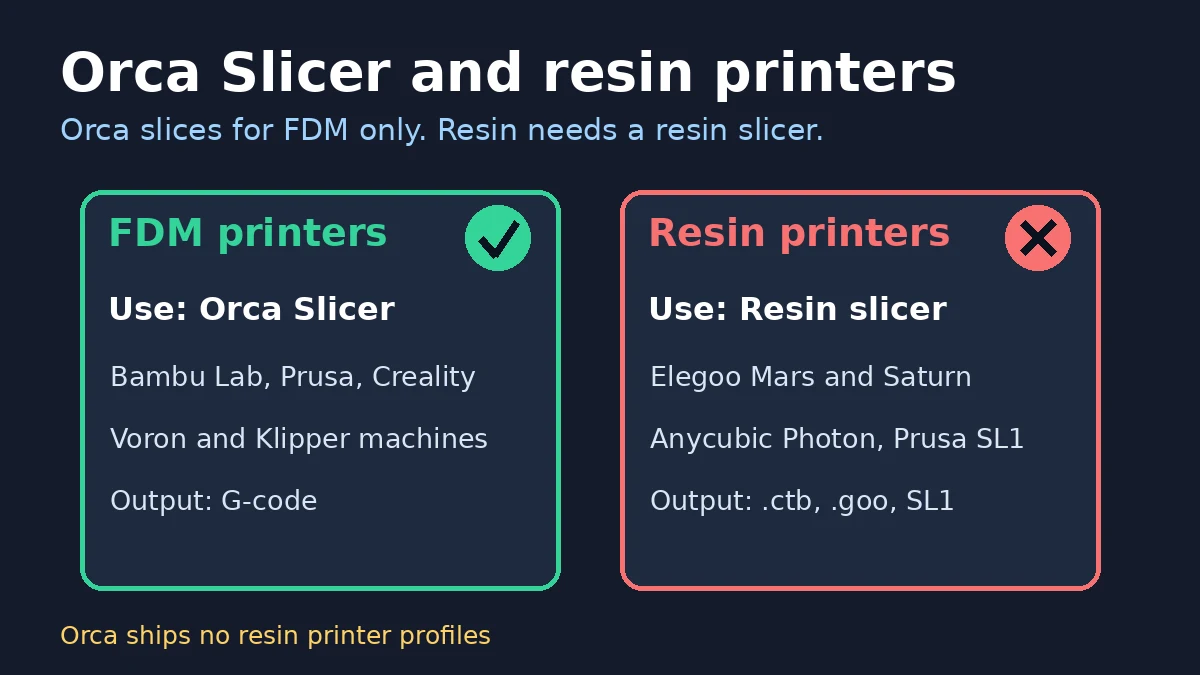
Orca Slicer resin support does not exist: Orca Slicer slices for FDM printers only. It outputs G-code for filament machines such as Bambu Lab, Prusa, Creality, Voron and Klipper printers. It cannot prepare files for resin printers like the Elegoo Mars, Anycubic Photon or Prusa SL1, and none of its bundled printer profiles covers a resin machine.
This guide explains why, shows which slicer fits each resin printer, answers the common question about resin-style supports on an FDM printer, and helps you decide what to use when you own both kinds of machine.
Does Orca Slicer support resin printers?
No. Orca Slicer targets FDM printing, and it has no resin workflow for the user. A resin printer needs a slicer that cuts the model into thousands of exposure images, sets lift speed and exposure time, and exports a printer-specific file. Orca instead creates toolpaths for a moving nozzle, with walls, infill, supports and temperatures.
The evidence sits in the printer list. Orca ships vendor profiles for dozens of FDM brands, from Bambu Lab and Creality to Voron and Prusa. That list contains no Elegoo Mars, Saturn, Anycubic Photon or similar resin machine. If a guide tells you to “pick your resin printer in Orca”, it does not describe the current version. Our guide to the best 3D printers compatible with Orca Slicer lists filament machines that work.
Which slicer should you use for a resin printer?
Use the slicer your printer’s maker names for your model. The output file differs between brands, and a slicer that opens your STL cannot necessarily write a file your printer reads.
| Printer | Slicer to use | Typical output |
|---|---|---|
| Elegoo Mars and Saturn | Elegoo SatelLite, Chitubox or Lychee | .goo, .ctb or .cbddlp, depending on the model |
| Anycubic Photon | Anycubic Photon Workshop | Model-specific file |
| Prusa SL1 and SL1S | PrusaSlicer in SLA mode | SL1 files |
| Elegoo Centauri, Neptune and other filament machines | Orca Slicer | G-code |
| Bambu Lab, Creality, Voron and Klipper printers | Orca Slicer | G-code or G-code 3MF |
Always match the file format to your exact model. Elegoo and Anycubic resin printers use different formats, so a file from one brand’s program will not load on the other’s printer. PrusaSlicer does both jobs, and our Orca Slicer vs Cura vs PrusaSlicer comparison explains where each one fits.
How do you choose between Orca Slicer and a resin slicer?
Follow these five steps whenever you buy a new machine.
- Identify your printer type. Check the product page. A printer that melts filament through a nozzle is FDM. A printer with a vat of liquid resin and a screen or laser is resin (MSLA or SLA).
- Check the file your printer reads. FDM printers read G-code or a G-code 3MF. Resin printers read exposure-image files such as .ctb, .cbddlp or .goo, and the format changes with the brand and model.
- Pick a resin slicer for resin printers. Use the slicer your printer maker names for your exact model. Chitubox, Lychee and the maker’s own program cover Elegoo Mars and Saturn printers, Anycubic Photon Workshop covers Anycubic resin printers, and PrusaSlicer covers the Prusa SL1 family.
- Pick Orca Slicer for FDM printers. Choose your FDM printer in the setup wizard. Orca then loads the matching machine, filament and process presets.
- Keep one slicer per printer type. Slice resin files in the resin program and filament files in Orca. If you want resin-style supports on an FDM part, add them in a resin slicer first and import the model into Orca.
Can Orca Slicer make resin-style supports for FDM?
Not yet. Several open feature requests on the OrcaSlicer GitHub page ask for supports that copy resin printing: thin columns with tiny tips that touch the model at a few points. People who print miniatures on FDM printers want them because they leave fewer scars and snap off cleanly. Orca’s current options are normal supports and tree supports.
Some makers work around the gap with a resin slicer. They place supports in Lychee or Chitubox, export the model with the supports attached, and import that file into Orca as a regular part. The Resin2FDM workflow by Painted4Combat uses Blender for the same job. Both routes take extra steps, and you turn off Orca’s own supports for that part.
For a quicker fix, tune the built-in supports and try tree supports. Our Orca Slicer overhang settings guide shows how to print steeper angles with fewer supports, and the Orca Slicer calibration guide helps you dial in the rest.
Can you use Orca Slicer and a resin slicer together?
Yes, and many makers do. Install both programs. Slice each part in the program that matches the printer, and keep each printer’s presets inside its own slicer. Orca’s Elegoo and Anycubic profiles cover their filament machines only. Setting up two printers in one slicer works well when both are FDM, and our printer selection guide explains how to add them.
If you only own a resin printer, Orca does not help you. A resin slicer from your printer’s maker is the right download.
Frequently asked questions
Does Orca Slicer support resin printers?
No. Orca Slicer slices for FDM printers and exports G-code. It has no printer profiles for resin machines such as the Elegoo Mars or Anycubic Photon.
Can Orca Slicer slice for SLA printers?
No. SLA and MSLA printers need exposure-image files and a resin slicer. Use the program from your printer’s maker, Chitubox, Lychee, or PrusaSlicer for the Prusa SL1.
Does Orca Slicer have resin-style supports for FDM printers?
Not yet. Users have opened requests for thin resin-style supports in FDM slicing, but Orca currently offers normal and tree supports. You can import a model with supports added in a resin slicer.
Can I use an Elegoo resin slicer with an Anycubic Photon printer?
Not reliably. Each brand writes its own file format, such as .goo for Elegoo, so a slicer built for one brand may not produce a file the other printer reads. Choose a slicer that lists your exact model.
What is Resin2FDM and does it work with Orca Slicer?
Resin2FDM is a workflow by Painted4Combat that uses Blender to turn a pre-supported resin model into one you can print on an FDM printer. You can import the resulting model into Orca as a normal part.
Use Orca Slicer for your filament printers
Orca Slicer is a free FDM slicer with built-in calibration tests and printer profiles. Pair it with a resin slicer for any resin machine. Grab the latest Orca Slicer download for your filament printers and set up your first profile in minutes.